How to download a Loom transcript without a Business plan
Loom limits caption downloads to creators and admins on paid plans. Here is how to get text, SRT and VTT from a public Loom link.
 Devansh TiwariAuthor
5 min read
Loom lets anyone who can open a video copy its transcript, but only Business and Enterprise accounts can download captions, and only as SRT. For a Loom video that opens without logging in, our Loom Transcript Scraper on Apify exports the transcript as plain text, SRT, VTT or timestamped lines, for under $1 per 1,000 videos.
On this page
What Loom lets you download, by plan
Loom shows the transcript on every plan, and anyone who can open the video can copy it. Saving it is narrower: only some paid accounts can download captions, and only as an SRT file. If you want plain text or timestamps in a spreadsheet, you are on your own.
This post covers a way around that for any Loom video that opens without logging in. It takes about two minutes for one video and works the same for a list of links, up to 25 per run on Apify's free plan.
Disclosure: GetAScraper (that's us) built the Loom Transcript Scraper used below. It is an Apify Actor, a small cloud program you run from your browser. It is not the only way to do this, and the manual option comes first.
From Loom's help page, as of 31 October 2026:
- Transcripts exist on every plan, in 50+ languages.
- Copy to clipboard works. There is a copy button on the transcript panel.
- Downloading captions is limited. Loom says downloadable captions are "only available to creators and admins on a Business/Business + AI plan" and to "members and admins on an Enterprise plan."
- The only format is SRT, through the "..." menu above the video, then "Download captions."
So if the video is someone else's, or you are not on one of those plans, you can copy but not export. Copying also means pasting into a doc by hand, once per video.
The manual fix: copy the transcript
For one video, the copy button is enough. Open the video, open the transcript panel, press copy, and paste it into a doc.
It stops being enough when you need any of these:
- timestamps in a spreadsheet, or an SRT or VTT file for a subtitle editor
- speaker labels
- more than a handful of videos
- the same videos checked every week for changes
That is where a tool saves time.
Step 1: check the link opens without logging in
Open the Loom link in a private browser window. If the video plays, you can use it below. If Loom asks you to sign in or request access, the Actor cannot read it either. It does not log in or get around permissions, and we would not want it to.
Step 2: open the Actor and paste your link
- Open the Loom Transcript Scraper on Apify. A free Apify account is enough to run it.
- Paste the Loom link into Loom Video URLs. You can add a whole list, one link per line.
- Under Transcript Formats, pick what you need:
txtfor plain text,srtorvttfor subtitle files,segmentsfor timestamped lines,turnsfor speaker turns,sentencesfor sentence-level lines. - Press Start.
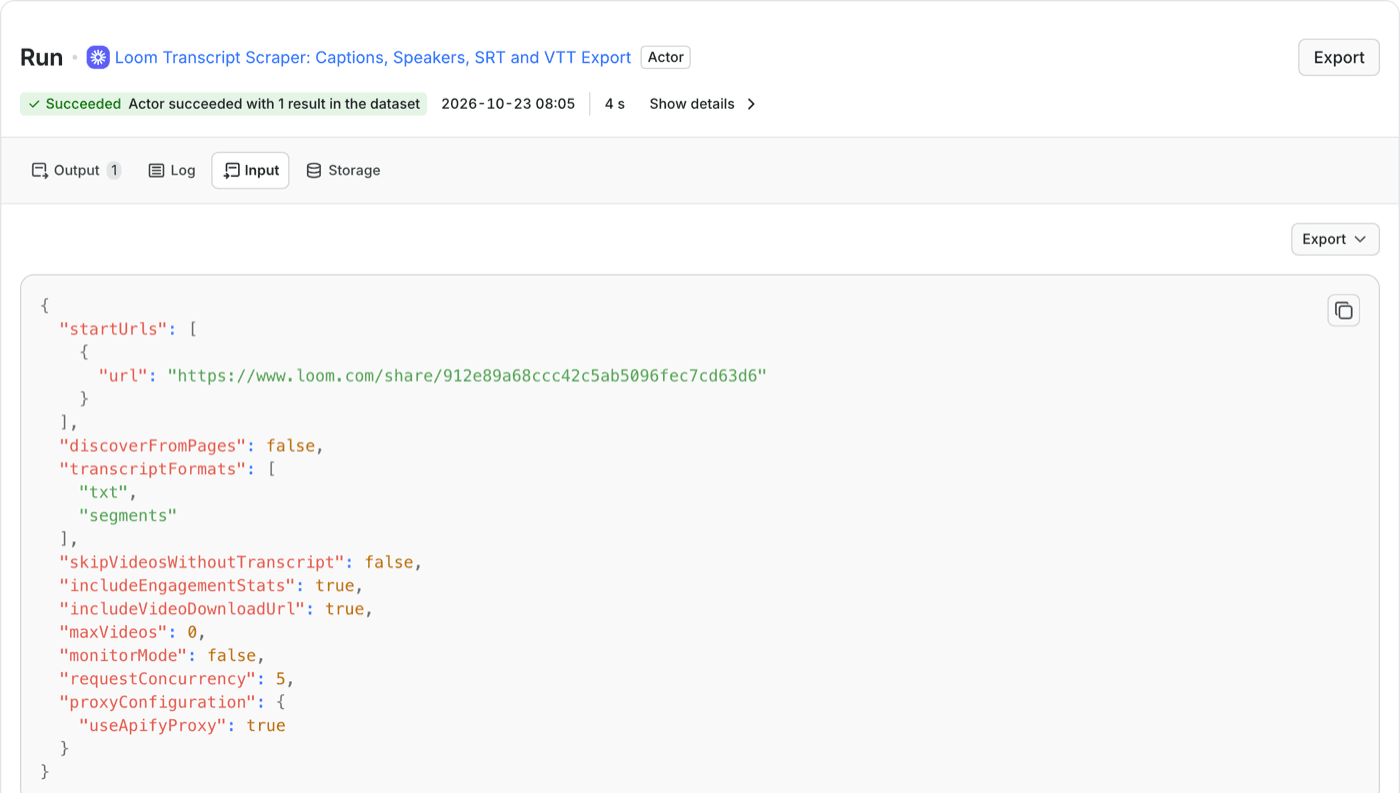
Step 3: read or export the result
Each video becomes one row. The transcript field holds the plain text. transcriptSRT and transcriptVTT hold the subtitle files when you select srt or vtt. transcriptSegments has the timestamped lines.
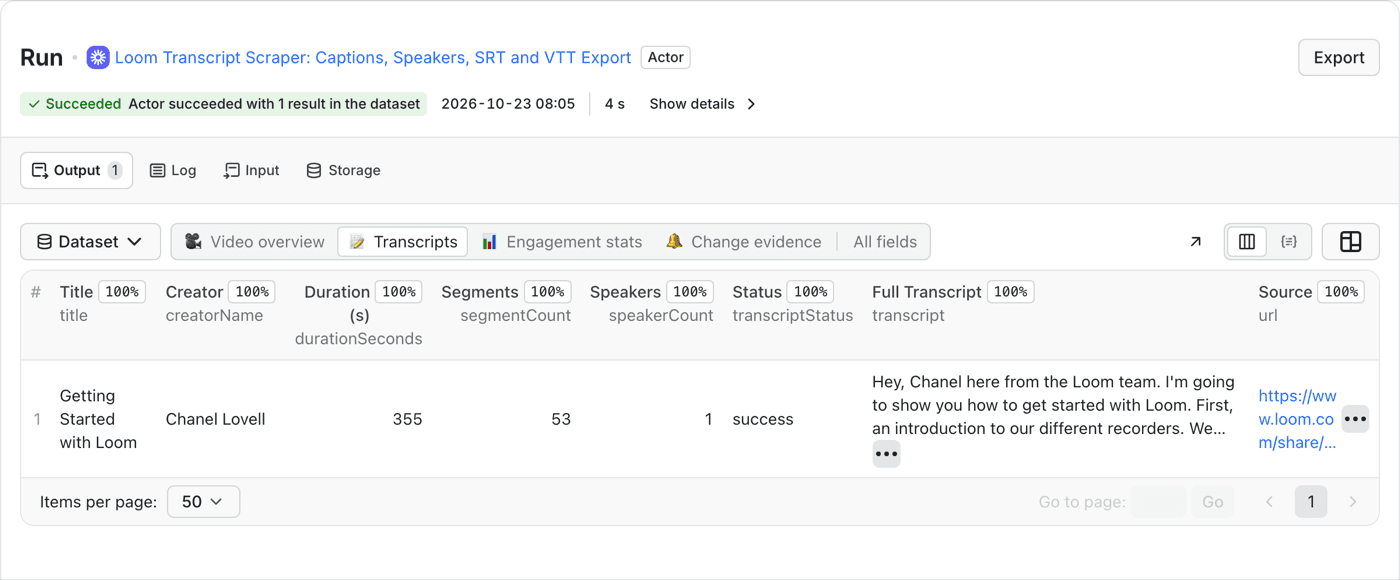
In that run, a video of 5 minutes 55 seconds came back as 53 timestamped segments, with the full transcript, in 4 seconds.
Use Export to download the whole dataset as JSON, CSV or Excel. If you only need the SRT, open the row and copy the field.
Speaker labels appear only when Loom supplies them. A one-person walkthrough shows one speaker, and a recorded meeting shows each one. If Loom does not label a speaker, the Actor leaves the label out. It never guesses.
Step 4: do many videos at once
Paste every link into Loom Video URLs, one per line. If the links sit on a Loom page, turn on Discover public Loom links from supplied Loom pages and the Actor collects the visible public links itself.
Free-plan runs are capped at 25 videos. Videos that fail are listed in the run's FAILED_VIDEOS record, so you can retry only those.
What it costs
Each video saved to your dataset is one result. At the time of writing, a result costs $0.00088 on the Free Apify plan, plus a $0.00005 start charge per run. That works out to $0.88 for 1,000 videos in one run, so under $1 per 1,000. Videos that fail are not saved and cost nothing. Check the Actor page for current rates, since Apify can change them.
What it will not do
- It cannot read private videos. Anything behind a login, password or workspace permission is out of reach.
- It does not transcribe audio. It returns the captions Loom already published. A video with no captions returns its public details and no transcript.
- Quality is Loom's. If Loom's captions mishear a product name, so will the export.
- Download links expire. The temporary MP4 and caption links Loom provides stop working on Loom's schedule. Run the Actor again for a fresh one.
Questions people ask
Can I download a Loom transcript for free?
You can copy it for free on any plan. A file download needs a Business creator or admin account, or an Enterprise member. For a public video, the Actor above gives you text, SRT and VTT without either.
Can I get the transcript of someone else's Loom?
Only if the link is public. A link that needs sign-in, a password or workspace access cannot be read by the Actor, and Loom does not let non-owners download captions.
Does it work if the video has no captions?
No. It returns what Loom already published. If a video has no captions, you get the video's public details and no transcript.
Need transcripts from a list of public Loom links?
Open the Loom Transcript Scraper