Turn a Loom video into action items with a copy-paste Claude prompt
Get a Loom transcript, paste one prompt into Claude, and get action items, open questions and dates. Here is the prompt and a real run.
 Devansh TiwariAuthor
4 min read
Get the transcript of a Loom video, paste it under the prompt below, and Claude returns action items, open questions and dates using only what the video says. We ran it on a public Loom status update and show the exact output, including one caption error it had to work around.
On this page
Why the video is not the checklist
To turn a Loom video into action items, copy its transcript and paste it under a prompt that asks only for tasks the speaker states, writes "not stated" for a missing owner or date, and quotes the phrase each item came from. Claude cannot watch a Loom link, so the transcript is what it reads.
A Loom update packs several asks into a minute or two of talking. The video has no checklist, and nobody replays it to write one.
A transcript fixes that, because Claude can read text. The part people get wrong is the prompt. A loose "summarize this" returns a tidy paragraph and drops the asks. A strict prompt returns the asks, with an owner and a date only when the speaker actually gave one.
This post gives you that prompt in three steps, then shows what it returned on a real public video.
Disclosure: GetAScraper (that's us) built the Loom Transcript Scraper used in step 1. The prompt works with any transcript, including one you copy by hand.
Step 1: get the transcript
For one video, open the transcript panel in Loom and use the copy button. That works on every plan, and the video must be one you can open.
For several videos, or if you want a file with timestamps, we covered the options in an earlier post. The Loom Transcript Scraper takes a list of public Loom links and returns one row per video.
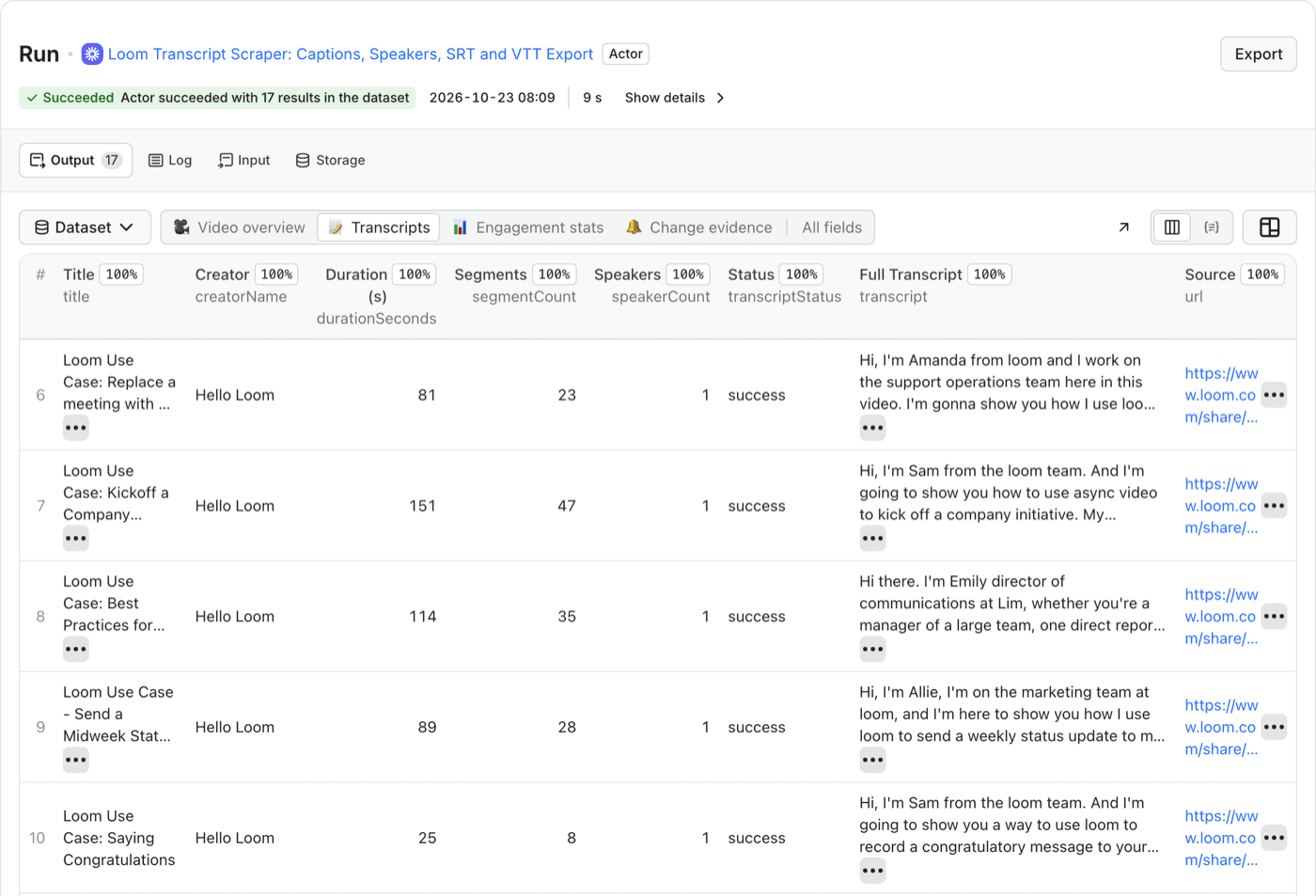
We used one of Loom's own public use-case videos, "Send a Midweek Status Update". It runs 89 seconds and has a single speaker. Its transcript is the transcript field of that row.
Step 2: paste the prompt
Put the prompt first and the transcript after it.
You are helping me pull action items out of a Loom video transcript.

Read the transcript at the end. Return four lists:

1. Action items: things the speaker says they will do, or asks someone
   else to do. For each, give what, who and when.
2. Questions waiting for an answer.
3. Decisions already made.
4. Dates and meetings mentioned.

Rules:
- Use only what the transcript says. Do not guess owners, deadlines or tasks.
- If who or when is not stated, write "not stated".
- After each item, quote the shortest phrase from the transcript that
  supports it.
- If a list has nothing in it, write "None".
- The transcript has no speaker labels. If you cannot tell who is
  speaking, write "speaker not identified".
- If the transcript looks like a caption error, say so instead of
  silently fixing it.

Transcript:
[paste the transcript here]
The prompt is plain text, so it also runs in ChatGPT or Gemini. We tested it only with Claude.
What each rule does:
- "Use only what the transcript says" stops invented owners and deadlines, which is the most common failure.
- "Not stated" gives the model a way to be honest when the speaker was vague.
- The quote lets you check every item against the video in seconds.
- "None" stops it padding an empty list.
- The caption rule matters because captions can contain mistakes.
Step 3: check the result
We ran this prompt on that transcript on 31 October 2026. The output below is from Claude Sonnet 5.5, unedited except for line breaks.
ACTION ITEMS
1. Get feedback from the brand team on the new email templates.
   Who: the speaker ("I've set up a meeting with them")
   When: Thursday
   "I've set up a meeting with them on Thursday."
2. Present the slides for the user feedback session.
   Who: the speaker
   When: next week
   "I'll be presenting next week."
3. Finish the social calendar.
   Who: the speaker
   When: hopefully by end of week
   "this should be ready to go live hopefully by end of week"
4. Give feedback on the social calendar.
   Who: the team (the speaker opens with "Hey, team")
   When: not stated
   "any feedback that you all have on that"

QUESTIONS WAITING FOR AN ANSWER
1. What are the hex codes for the new colors released with the brand guide?
   Asked of: the team
   "if anybody knows those, let me know."

DECISIONS
None

DATES AND MEETINGS
- Kickoff campaign goes live tomorrow, to about a million users.
  "this kickoff campaign that's going live tomorrow"
- Meeting with the brand team on Thursday. Everyone is welcome.
  "Everybody's welcome to join if they're interested."
- User feedback presentation next week. A calendar invite has been sent.
  "you all should have gotten a calendar invite on this"
- Social calendar ready by end of week, hopefully.

NOTES
- The speaker uses "I" throughout, so I treated this as one speaker.
- The caption reads "we need some in from their end on these new email
  templates". "some in" looks like a captioning error for "input". I did
  not make it a separate item.
On this 89-second video the prompt returned four action items, one open question, no decisions and four dates or meetings, and it flagged one caption error.
Read it against the video once. In this run every quoted phrase appears in the transcript word for word. Two things are worth noticing. The prompt did not invent a date for the feedback ask, and it flagged the caption error instead of repairing it quietly.
What goes wrong
- It can miss or misread an ask. Claude works from the text, with no tone of voice and no screen. A request made only by showing something on screen will not be in the transcript.
- Owners are guesses unless stated. The prompt asks for "not stated", but spot-check any owner that looks too neat.
- Captions contain errors. The transcript above has one. A misheard name or number goes straight into an action item, and the quote makes it easy to catch.
- Speaker labels exist only when Loom supplies them. On a recorded meeting with several voices, the "who" gets weaker.
- A tutorial has few action items. If nobody in the video assigns work, the right answer is "None". Do not read an empty list as a failure.
- Privacy. Do not paste a private Loom transcript into a tool your company has not approved. The Actor reads only public links, and the copy button works only on videos you can open.
Questions people ask
Can Claude summarize a Loom video directly?
Claude reads text, so it needs the transcript, not the video link. Copy the transcript from Loom or export it, then paste it under the prompt above. A bare link gives it nothing to read.
Does this work for meeting recordings?
It works on any transcript, but results depend on speaker labels and caption quality. Loom supplies speaker labels only on some recordings. Without them, the "who" for each item becomes less reliable, so check owners against the video.
Is the output safe to send without checking?
No. Read it against the video once before you share it. The quoted phrases make that quick, and a wrong item is easy to spot beside the sentence it came from.
Why not use Loom's built-in AI?
If your workspace has it and the video is yours, try that first. This prompt is for the other cases: a public video from someone else, a transcript from another tool, or when you want each item quoted back to the sentence it came from.
Need transcripts from a list of public Loom links?
Open the Loom Transcript Scraper